How do I keep a note on top of other windows on a Mac?
Tested on macOS 27.2, 29 November 2026.
A phone number while you fill in a form, a list of steps while you follow them, a figure while you write: sometimes a note is only useful if it stays in view.
Stickies floats
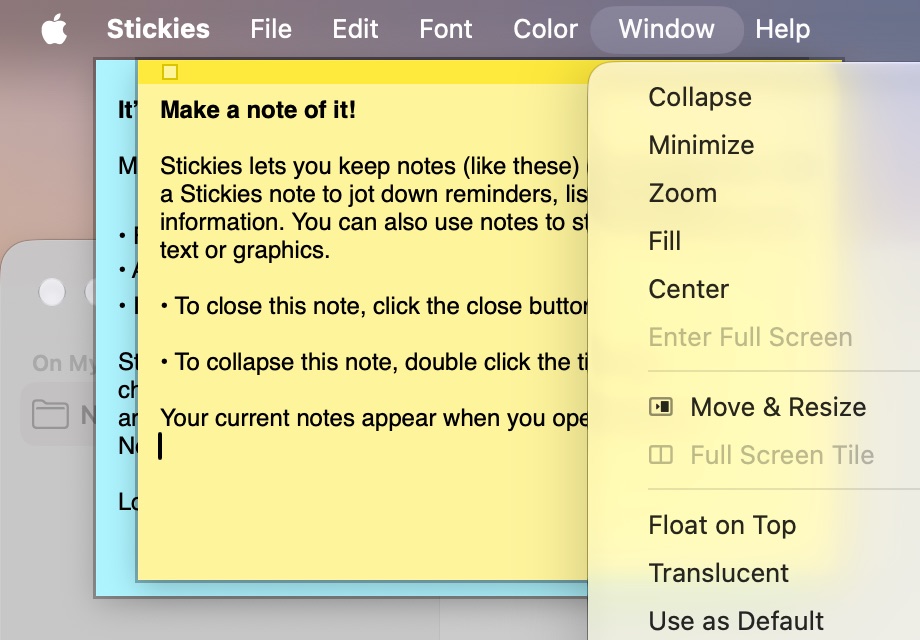
Stickies, which comes with every Mac, has a setting for this. Select a sticky, then choose Window, Float on Top, and that note stays above every other window, even when you click into another app. Choose it again to let the note go back behind.
Two things to know. Float on Top applies to one sticky at a time. And Stickies opens all of your stickies when it starts, so the desktop fills with notes you were not looking for.
What about other apps?
macOS has no general "keep this window on top" setting. Some apps have their own (video players often do). Picture in Picture keeps a video in view, but only a video.
A lighter way
If all you need is one note in view for a while, a scratchpad with its own pin shortcut is quicker: pin it, use it, unpin it.
The way your Mac already does it
Open Stickies, choose Window, Float on Top.
Where it runs out
Stickies floats, but it is a separate app with its own notes, and it opens with every sticky you have.
With Jotter
Coming
Press Command-P in a Jotter note to pin it over every other window; press it again to unpin.
Jotter is coming.
Jotter is not available to download yet. Leave your email and we will write when it is.