With several windows open, the one you are working in can get lost among the others. What helps is having everything else fade back a little, so the window in front is the bright one.
macOS has no setting that dims background windows. It has two ways to move them out of the way instead, and both are worth knowing.
Stage Manager and Hide Others
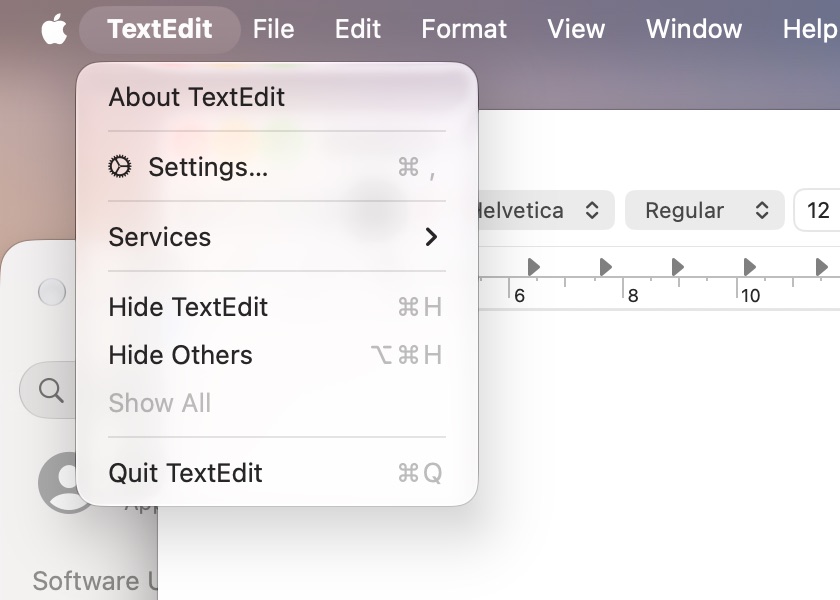
Stage Manager keeps the window you are using in the middle of the screen and puts the others in a strip at the side. Hide Others (Option-Command-H) hides every app except the one in front. Both clear the screen. Both also take away the windows you were copying from or keeping an eye on.
Where they are on macOS 27
Stage Manager is in System Settings, Desktop & Dock, under Desktop & Stage Manager. The same section decides whether desktop items show on the desktop, in Stage Manager, or both. Hide Others is in every app's own menu (the menu named after the app), beside Hide, with Option-Command-H as its shortcut.
Dimming instead of hiding
Dimming leaves every window where it is and lowers the light on the ones you are not using. Click another window and the light moves with you. It suits work where you look across windows, such as writing from notes or checking a figure in a spreadsheet.
The way your Mac already does it
Turn on Stage Manager in System Settings, Desktop & Dock; the window you are using stays in the middle and the rest move to the side.
Or press Option-Command-H to hide every app except the one in front.
Where it runs out
Both move windows out of the way; neither keeps the others visible but quieter.
With SoftFocus
Coming
Open SoftFocus; every window except the one you are using is dimmed.
Press Control-Option-Command-H to turn dimming off and on again, or scroll on its menu bar icon to change how dark it is.
SoftFocus is coming.
SoftFocus is not available to download yet. Leave your email and we will write when it is.